

You want to be sure your website visitors on phones or tablets are having as good an experience as those on desktop. Especially as mobile traffic continues to grow.
In this video, I’ll show you how to use Google Analytics 4 to see what devices your website visitors are actually using, how engagement compares across those devices and whether to invest in leveling up your mobile experience.
This video is one of several excerpts from our Nonprofit Website Office Hours on Google Analytics 4. You can also see the full recording on YouTube.
Video Transcript
This transcript has been lightly edited for clarity.
The last standalone report we’re going to look at is the devices report.
I doubt I’m breaking news to anyone here that mobile traffic continues to grow. And if your visitors are using mobile devices like phones or tablets to view and engage with your website, it’s important to ensure your site looks and works the way it should and remains easy to use for folks who are not on a computer.
But talking about things like visitor experience can sometimes feel subjective. Everyone has a different opinion about how easy to use something looks or how confusing something is.
Hopefully this report helps you bring some actual data to back up the experience you’re providing your visitors on smaller screens.
With this report, we can answer questions like:
- How much traffic are we actually getting from visitors on smaller screens like phones or tablets?
- How does visitor engagement compare based on the device that folks are using?
- Do we need to spend time leveling up the mobile experience? Is that going to be a good use of our limited time, budget, resources in general?
In terms of how we find that in Google Analytics, we’re going to be in User, but instead of User attributes, we’re going to go down to Tech and click on Tech details.
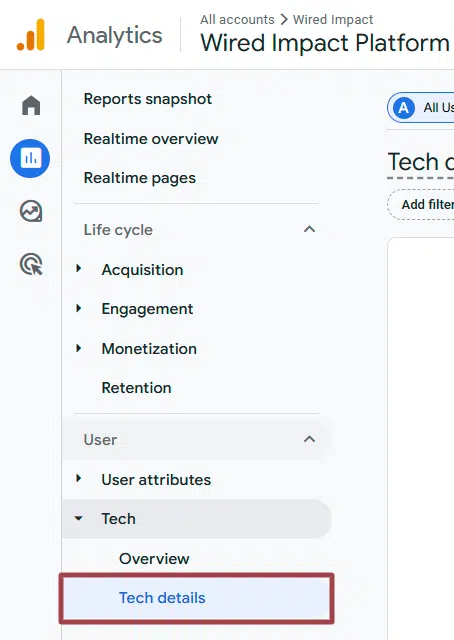
You’ll see this defaults to showing us the browser folks are using, which is interesting. Especially if you’re a developer, it could be interesting. But for most nonprofiteers, you’re not going to need to spend much time on the browser.
So we’re going to click that dropdown and select “Device category” here, and you’ll see what this is showing desktop and mobile.

Again, the caveat here is that this is just our demo site. If I expand the end of this window, this is how you set a custom date range.
You can click the drop down and set a start and end date. I’m going to set this at the beginning of last year and set my end date to be today. Let’s see if we have any tablet data in there.
Yep, so these are usually the three that you’ll see. You’ll see desktop, mobile and tablet. And then pretty similar columns that we looked at previously where we can see active users, new users, engaged sessions, start to compare the engagement rate.
Looking at this data here, I would say we don’t need to spend a ton of time leveling up the mobile experience because 99% of our traffic is coming to the site on desktop.
I would guess that your mix is going to look a little different when you get in there. When you look at your actual organization’s website, I would guess you’re going to see more mobile and tablet traffic.
But it still could be really illuminating to see what those percentages look like. And a lot of times, it’ll vary based on your marketing mix. What channels are you using to drive people? Because some channels will skew more heavily towards mobile traffic.
Again, to get there, you’re going to the User section of our Reports and we’re going to click Tech >> Tech details and then just change that dropdown from the default “Browser” to “Device category” and you’ll be all set.
What You Should Do Now
01. Come to Nonprofit Website Office Hours
We cover a new topic every few weeks. Plus get a live answer to any website-related question you're wrestling with.
02. Book a Website Call
Find a time to discuss your nonprofit's website needs. Discover what's worked for other nonprofits like you and see how easy building your new site can be.
Comments